
Audit Your Shopify Apps
Peak season doesn’t break stores because demand goes up, it breaks stores because systems fail under pressure: order routing gets messy, inventory goes out of sync, support tickets pile up, and teams lose time chasing issues that should’ve been solved weeks earlier.
Summer is usually the calm before the storm. That’s exactly why it’s the best time to audit Shopify apps and confirm every tool in your stack is (1) reliable, (2) understood by your team, and (3) supported when things get weird.
This guide walks through what to review, what red flags to look for, and the questions to ask each app partner before your busiest weeks arrive.
Why merchants should review their app stack during slower months
Reduce avoidable risk
Every additional app adds surface area: another integration, another set of permissions, another “sync” that may or may not behave how you assume.
A summer audit helps you:
- spot fragile workflows (manual steps, unclear rules, missing fallbacks)
- reduce dependency on tools you don’t fully trust
- prevent the classic “everything was fine until Black Friday” scenario
Replace weak tools before they become urgent problems
Replacing an app in October is stressful. Replacing it in July is manageable.
In summer, you have time to:
- migrate data cleanly (products, mappings, settings)
- test edge cases (partial refunds, exchanges, bundles, multi-location inventory)
- train the team and document the workflow
Improve team efficiency ahead of peak periods
Peak season amplifies inefficiency. If your team needs 6 clicks and a spreadsheet to verify a sync, you’re going to feel it when daily order volume doubles.
A good audit doesn’t just reduce breakage, it reduces time-to-resolution when something does go wrong.
What a good Shopify app audit should include
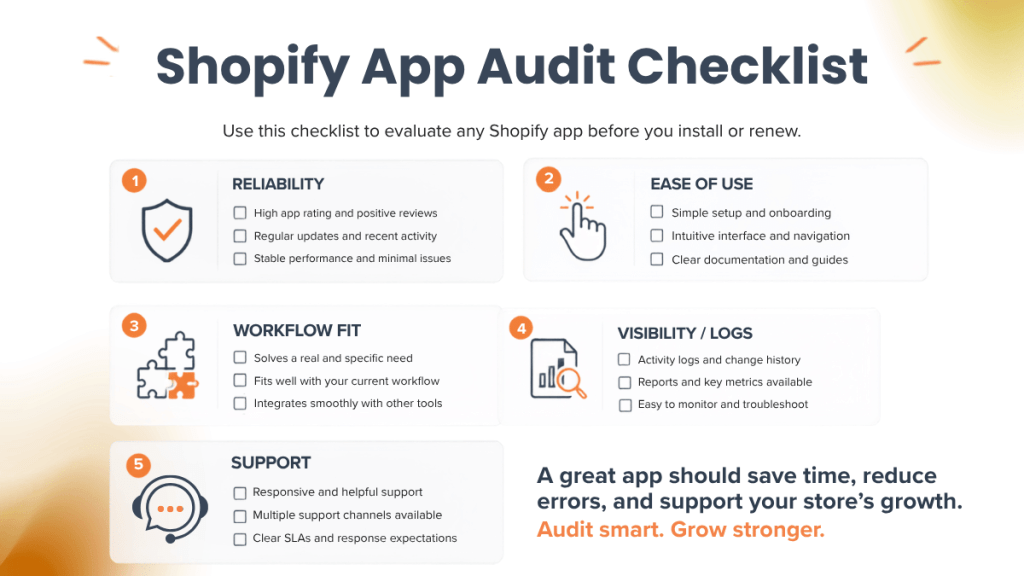
Think of this as an ecommerce tools checklist: you’re grading each tool on whether it can be trusted when you can least afford downtime.
Reliability and uptime
Ask:
- Does the tool have a status page or incident history?
- Do they publish maintenance windows?
- What happens during outages does it retry automatically, queue updates, or silently fail?
What to document internally:
For each app, write one sentence: “If this app goes down, the business impact is ______.”
This turns “nice to have” apps into clear priority tiers.
Ease of use for your team
If a tool “works” but only one person knows how, it’s a risk.
Review:
- Can support reps, ops leads, and warehouse staff all use it confidently?
- Are settings clear, or is it easy to misconfigure?
- Are error messages actionable?
Quick test: have someone who didn’t set up the app complete a routine task while you observe. If they can’t, peak season will be painful.
Compatibility with your workflows
Most app issues aren’t bugs, they’re mismatches between expectations and reality.
Confirm the app supports your real-world workflows:
- multi-variant products (variant-level linking/mapping)
- multi-location inventory
- split fulfillment (e.g., some SKUs fulfilled differently)
- bundles/kits (and how inventory is decremented)
- refunds/exchanges and order edits
If your business has exceptions (and it does), make sure the tool does too.
Access to support when needed
The best feature in the world doesn’t help if you can’t get help.
Review:
- support channels (email, chat, phone, ticket portal)
- typical response times during busy periods
- whether support can view logs and diagnose quickly
Operational truth: during peak, you don’t need “friendly support.” You need fast, specific support.
Red flags to watch for in ecommerce tools
H3: Unclear sync behavior
If you can’t describe the sync rules in plain English, you’re running on assumptions.
Red flags:
- “near real-time” with no explanation of timing, retries, or limits
- inventory “sometimes” updates without a clear pattern
- order imports that depend on statuses you didn’t know mattered
What to do: require the vendor to confirm exactly:
- what triggers a sync (and what doesn’t)
- expected timing (and what can delay it)
- what happens when a match/link fails
Lack of visibility or logs
When something breaks, you need answers like:
- Did the app attempt the sync?
- Was it accepted by the destination platform?
- Was there a validation error?
- Is it queued, retried, or blocked?
If the tool doesn’t provide a clear audit trail (or support can’t provide it), troubleshooting becomes guesswork.
Poor documentation
Documentation is part of the product.
Red flags:
- setup guides that skip key options (sync direction, location mapping, linking method)
- no examples for common edge cases
- “contact support” as the answer to basic configuration
Slow or unhelpful support
Peak season support is a different game. If you’ve ever waited days for a reply to a critical sync issue, consider that a warning, because response times usually worsen when everyone is busy.
Why support matters as much as features
Every store has edge cases
Even if two merchants sell “the same products,” their operations differ:
- custom SKUs and naming conventions
- multiple sales channels
- unique fulfillment rules
- specific reporting requirements
Edge cases are normal. The question is whether your tools treat them as “supported use cases” or “good luck.”
Setup is only part of the story
Many issues show up after setup:
- new products added without required identifiers
- fulfillment method changes (and unexpected downstream effects)
- seasonal staff who don’t know the tool’s do’s/don’ts
- platform changes from Shopify/Amazon that require adjustments
A tool is only “reliable” if it stays reliable as your store evolves.
Fast support helps protect operations
Support isn’t just about fixing problems, it’s about protecting revenue and reducing operational chaos.
When support is strong, you can:
- restore normal operations quickly
- prevent repeat incidents via clear guidance
- build internal playbooks based on real diagnoses
Questions to ask each tool partner before busy season
Use these questions as your audit script. If a vendor can’t answer clearly, treat that as signal.
Who do I contact if something breaks?
- Is there a dedicated support email?
- Is there an urgent escalation path for outages?
- Do you have coverage outside business hours during peak?
How quickly does support respond?
Ask for specifics:
- average first response time
- expected resolution time for common issues
- whether peak season impacts SLAs
Can the tool handle my order and SKU volume?
Don’t accept vague “it should be fine.”
Ask:
- tested limits (orders/day, SKUs, locations, marketplaces)
- whether performance changes as catalog size grows
- whether there are rate limits or batching windows
Is there help for custom workflows?
Ask for examples:
- multi-location inventory
- mixed fulfillment (FBA/FBM-type split, 3PL + in-house, etc.)
- mapping methods (SKU vs barcode vs metafields)
- handling “Need Attention” / validation queues
Recommendation: keep a one-page “Peak Readiness” doc per critical app with:
- owner (who’s responsible internally)
- settings snapshot
- known constraints
- support contact + escalation steps
- “what to check first” troubleshooting steps
Not all apps are equal under pressure. Summer is the right moment to review your stack and make sure your key workflows rely on tools with responsive support and reliable sync like ToolE Amazon Easy Sync, so you go into peak season with fewer surprises and faster resolutions when edge cases happen.